How an MCP tool actually works (part 1)
Like so many of you, I’ve been quite reliant on my AI tools for writing my code and building my applications. I think that an MCP server can be a bit of a black box for many of us, so I decided to take a look under the hood of Laravel Boost, to trace how one of its tools actually reaches our AI model, and understand what the model is actually seeing.
Starting the server
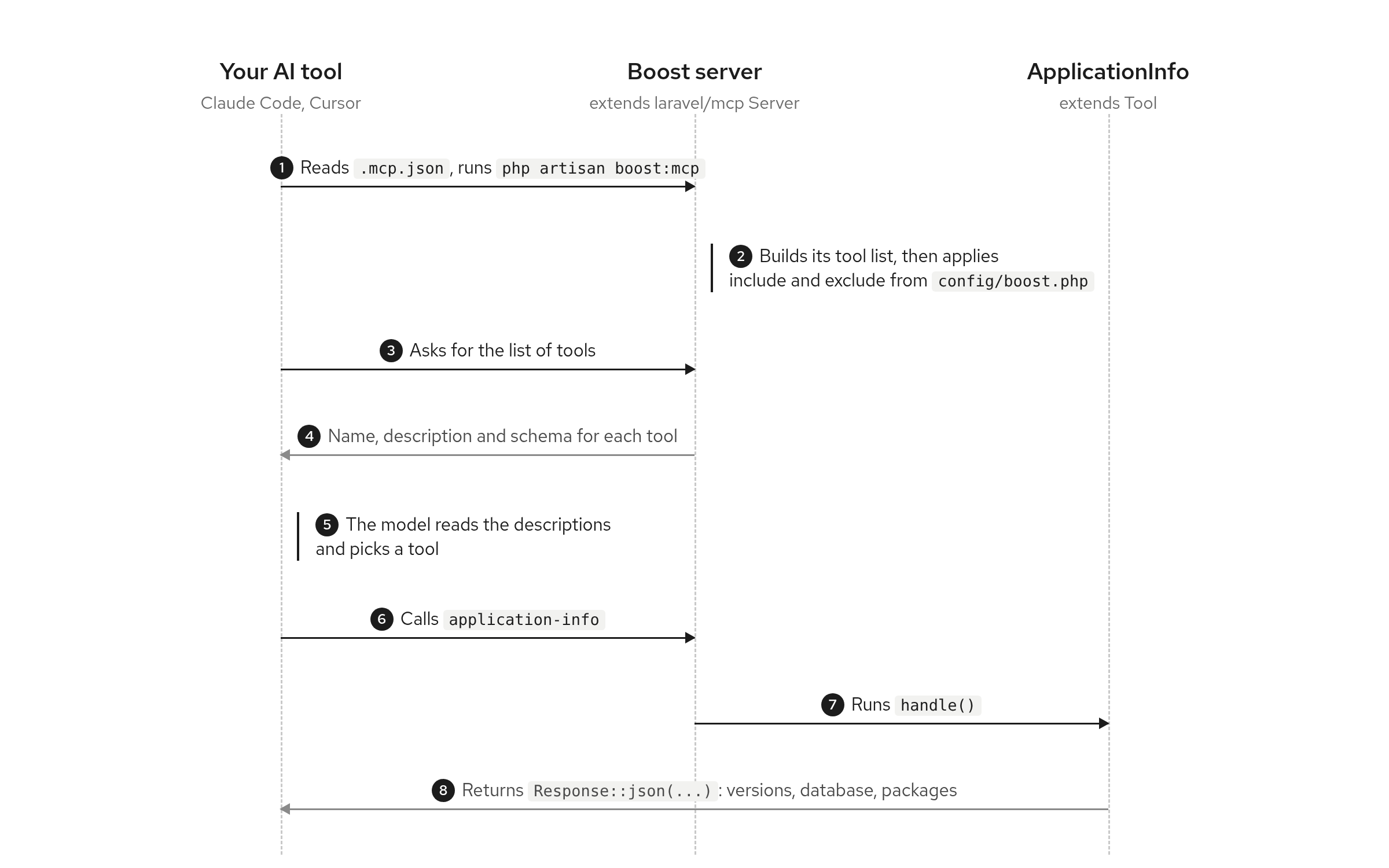
Your AI tool doesn’t discover MCP servers on its own. The project’s .mcp.json tells it what command to run, which for Boost is php artisan boost:mcp. When Claude (or whatever) opens the project, it runs that command and connects to the server.
What the model sees
Once connected, it gets “served” a list of tools: functions it can call. It uses these functions to do things, rather than read the code behind them. Each tool comes with a name, a description, and a schema which tells the AI agent what arguments it takes, and this is all that the model sees. In reality, the description does a lot of the work; for example, the ApplicationInfo tool from Laravel Boost tells the model, “You should use this tool on each new chat.” That description is for the model, not for us humans.
Where the list comes from
Boost’s server is a class that extends the base Server class from the laravel/mcp package. When it starts, it builds its default list of tools, then adjusts it using two lists in your project’s config/boost.php: one to include tools and one to exclude them. That setting isn’t in Boost’s default config, so you add it yourself in that config file.
For example, if I don’t want AI tools using Tinker, which can run any PHP code:
'mcp' => [
    'tools' => [
        'exclude' => [
            \Laravel\Boost\Mcp\Tools\Tinker::class,
        ],
        'include' => [],
    ],
],
What runs without asking
Finally, Claude’s settings.local.json decides which tools and commands it’s allowed to run without asking me first. Usually, this gets edited by Claude itself every time it asks for a new permission and you choose to “always allow”, and it gets recorded there for you.
The takeaway
For me, the biggest thing is that an MCP server isn’t really a black box at all. It’s a simple mechanism, really:
- our AI tool reads a config file to know how to start the server,
- the server hands back a list of tools with a name and a description for each one,
- the model picks from that list based on those descriptions. It never sees the code behind them.
That means that there are still some places that we, as developers in the driver’s seat of our project, actually have some control over what the model can do. Our config/boost.php decides which tools are even on the list, and the descriptions of each tool allow the model to decide which one to use.
So, whenever I write my own tools, I need to put some care into those descriptions, and possibly opt-in with that include array.
I’m going to keep digging into this, and hopefully shed some additional light on what’s happening when our agents get to work with an MCP server.
This is the first part of a short series I’m writing on AI in Laravel. Next up, I’ll look at how I built a tool by hand in Scout, my AI content assistant for Statamic, and what makes a tool description the model actually follows. If you’d like each part in your inbox, along with a few things that don’t make it to the blog, sign up for the AI for Laravel series below.
Join my Email List
Get notified about my work with Statamic - from new YouTube videos to articles and tutorials on my blog, and more.